
User's Manual Part 2







276
Data Display/Edit/Management
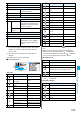
Delete all
You can delete all files in the folder.
Enter your Terminal Security Code
YES
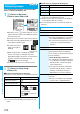
Multiple-choice
You can select multiple files and operate them.
Put a check mark for the files to be
operated
i
()
Select an item.
Picture/Title name/Listing
. . . . . . . . . . . . . . . . . . See page 276,
page 293 and
page 308.
Delete
. . . . . . . . . . . . See “Delete this” on
page 275.
DPOF setting
. . . . . . See page 311.
Copy
. . . . . . . . . . . . . See page 275.
Move
. . . . . . . . . . . . . See page 275
.
Copy to microSD
. . . See page 296.
Copy to phone
. . . . . See page 297.
Send Ir data
. . . . . . . . See page 305.
Select all
. . . . . . . . . . Selects all files.
Release all
. . . . . . . . . Releases all selected
files.
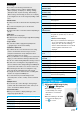
Memory info
You can display the used memory space
(estimate)/number of stored items.
Sort
You can change displayed order.
Select an order.
p
You cannot sort the files on microSD
memory card.
Picture/
Title name
You can switch the lists of still images.
p
You can switch by pressing
c
()
from the Still Image List.
Information
<Edit title>
p
You may not be able to edit the title when the unused space
on the microSD memory card is short.
p
You may not be able to edit the title depending on the file.
p
You cannot edit the titles of the pre-installed images in the
“Decomail-picture”, “Frame”, “Stamp”, and images in
“Pre-installed” folders.
<Display picture>
p
You may not be able to execute Display Picture depending
on the file.
p
Flash movies are played back at the volume set for “Phone”
of “Ring volume”. When “Phone” of “Ring volume” is set to
“Step”, they are played back at “Level 2”.
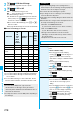
Function menu
Operation/Explanation
<Set display>
p
Flash movies can be pasted only “Stand-by display”,
“Wake-up display”, “Dialing”, “Calling”, “Videophone dial”,
“V.phone incoming”, “Mail sending”, “Mail receiving”,
“Checking”, and “Mail/msg. rct. result”.
p
Animation GIF images cannot paste to the videophone
related items other than “Videophone dial” or “V.phone
incoming”.
p
The displayed size might differ from actual size depending
on the image size or the display pasted to.
p
You cannot execute “Set display” for some image files.
<Attach to mail>
p
You may not be able to compose i-mode mail depending on
the image.
p
See page 146 for attaching a file set with the file restriction
to mail.
<Decorate mail>
p
When an image size is larger than Sub-QCIF (128 x 96)
size, the display for selecting how to convert the image size
appears. The converted still image is saved as a separate
new file.
Select “Attach directly”; then the image size does not
change.
Select “Sub-QCIF scale down”; then the image size is
scaled down to Sub-QCIF (128 x 96) size or smaller with its
proportional ratio retained.
Select “Sub-QCIF trim away”; then the image size is scaled
down or cut out to Sub-QCIF (128 x 96) size or smaller with
its proportional ratio retained.
If the file size exceeds the maximum size to create
Deco-mail, its size is converted to the maximum size to
create Deco-mail or less.
p
Even if you scale down or cut out the still image to
Sub-QCIF (128 x 96) size, you can again scale down or cut
it out by pressing
+l
( ) or pressing
+i
( ) and
selecting “Cancel”. When you press
+i
( ) and select
“Set”, the Message Composition display appears.
p
You may not be able to create Deco-mail depending on the
image.
<Store in Center>
p
You cannot save the following still images:
・
Images whose sizes exceed 100 Kbytes
・
Images whose output from the FOMA phone is prohibited
・
Images other than in JPEG or GIF format
p
You cannot use Data Security Service when you are out of
the service area.
p
When you have not signed up for Data Security Service, the
message to that effect appears.
p
You can download the saved still images from the Data
Storage Center site to your FOMA phone. For details, refer
to “Mobile Phone User’s Guide [i-mode]”.
Information