
User's Manual Part 2







269
Full Browser/PC Movie
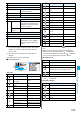
Function Menu during Pause/at the End of Playback
Function menu
Operation/Explanation
Fast
The PC movie is played back fast.
p
To cancel it, press
l
().
Rewind
The PC movie is played back fast in the
opposite direction.
p
To cancel it, press
l
().
Stop
You can end playback.
Position to
play
You can set the start position for playing back
the PC movie.
Use
No
to move the cursor position of
the time bar and press
Oo
().
p
To cancel, press
r
.
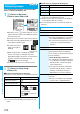
Sound effect
(Remaster)
You can bring the sound from an earphone or
Bluetooth device to the original sound by
complementing high-pitch range lost at data
compression.
Remaster
ON or OFF
Sound effect
(Listening)
You can set sound effect for listening.
Listening
Select an item.
Surround
. . . . Makes the sound natural and
stereophonic.
Natur 1/2
. . . . Complements the cooped-up
feeling specific to earphones
and plays back natural sound.
Select 1 or 2 according to your
taste.
OFF
. . . . . . . . Sets Listening to “OFF”.
p
“Natur 1/2” is effective for the sound from an
earphone or Bluetooth device.
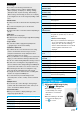
Sound effect
(Equalizer)
You can change the quality of sound from an
earphone or Bluetooth device.
Equalizer
Select an item.
Normal
. . . . Reproduces normal sound
quality.
S-XBS1
. . . . Enhances bass sound.
S-XBS2
. . . . Enhances bass sound more
deeply than S-XBS1.
Train
. . . . . . Minimizes abnormal sound that
causes sound leakage.
Contents info
You can display the PC movie title, file name
and others.
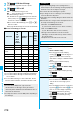
Position
memory
You can store a position memory in the PC
movie. Operate it at the desired position in
pause state.
Select a position memory number to be
stored.
p
You cannot select “Marker to resume”.
Description
See page 268
Copy URL
While playing back a PC movie published on
the Internet, you can copy the URL of that PC
movie.
p
You can copy up to 512 half-pitch
characters for the URL.
Display size
You can set the display whether to display a
PC movie in the original size (Actual size) or
to fit to the display size.
Actual size or Fit in display
p
Even if you set to “Actual size”, the PC
movie in excess of the display size is
reduced to the display size.
Information
<Position to play>
p
You might not be able to select the position to play
depending on the PC movies.
<Sound effect>
p
Even if an earphone or Bluetooth device is not connected,
the respective setting contents are displayed on the display.
<Position memory>
p
You might not be able to store the position memory
depending on the PC movies.
<Display size>
p
Depending on the image size, the image might be displayed
with the right or bottom side cut off.
Function menu
Operation/Explanation