
User's Manual Part 2




268
Full Browser/PC Movie
■
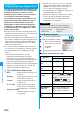
When you select “Position memory” from the PC
Movie Type Selection display
The Position Memory Selection display appears. When you
select “Marker to resume” or “Position memory1 through 9”,
the PC movie is played back from the stored position.
p
You can display information about the position memory by
pressing
i
( ) and selecting “Posit. memory info”.
p
To delete “Position memory”, press
i
( ) and
select “Multiple-choice”, “Delete this”, or “Delete all”. You
cannot delete “Marker to resume”.
p
When a PC movie with a position memory has been
deleted or moved to another folder, or when its file name
has been edited, you cannot play it back.
p
Even when you play back a PC movie from a position
memory, it may be played back from the beginning,
depending on the PC movie.
■
When you select “Played history” from the PC Movie
Type Selection display
When you play back a PC movie, the
URL or storage location of that file is
stored as a history. Up to 30 histories
are stored, and when those are
exceeded, the oldest history is
overwritten. Select a played history to
play back the PC movie according to the history information.
p
When a PC movie stored in a played history has been
deleted or moved to another folder, you cannot play it
back.
p
When you play back an obtained but unsaved PC movie from
the Obtaining Completion display, it is not
stored
in Played
History.
Function Menu of the PC Movie Folder List
Marker to
resume
This
is stored automatically when a call comes
in, an alarm operates, or the battery level goes
flat during playback of a PC movie, or when you
terminate PC Movie Player during playback.
Position
memory
You can
store in any optional position in a PC
movie, and create up to nine position memories.
(See page 269)
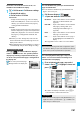
Played History List
Function menu
Operation/Explanation
Add folder
Enter a folder name.
p
You can enter up to 31 full-pitch/63
half-pitch characters.
Edit folder
name
Enter a folder name.
p
You can enter up to 31 full-pitch/63
half-pitch characters.
Delete folder
Enter your Terminal Security Code
YES
Select storage
You can set a destination folder for saving
downloaded PC movies to the microSD
memory card.
YES
Information
<Select storage>
p
“ ” is displayed for the folder set as a destination folder.
Function Menu of the PC Movie List/Played History List
Function menu
Operation/Explanation
Contents info
You can display the file title, file name, and
others of the PC movie.
Move
You can move the PC movie to another folder.
Select a destination folder.
Edit title
(Edit title)
Edit title
Enter a title.
p
You can enter up to 18 full-pitch/36
half-pitch characters.
Edit title
(Reset title)
You can reset the title to the default.
Reset title
YES
Copy
You can copy the PC movie to another folder.
Select a destination folder.
History info
You can display information of the played history.
Position
memory
You can store the URL information of the PC
movie stored in Played History to a position
memory. When you play back the file from the
position memory, it is played back from the
beginning.
Select a position memory number to be
registered.
p
You cannot select “Marker to resume”.
Multiple-choice
You can select multiple files and operate them.
Put a check mark for files to be operated
i
()
Select an item.
Delete
. . . . . . . See “Delete this” on page 268.
Copy
. . . . . . . See page 268.
Move
. . . . . . . See page 268.
Description
You can display the lyric or description of the
PC movie.
The words view or Description view
p
Up to 1,024 full-pitch/2,048 half-pitch
characters can be displayed in each.
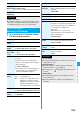
Memory info
You can display the used memory space
(estimate).
Delete this
YES
Delete all
You can delete all the files in the folder.
Enter your Terminal Security Code
YES
Listing
You can change the display format of PC
Movie List.
Title or File name