
User's Manual Part 2





267
Full Browser/PC Movie
※
1
You might not be able to operate this for some PC movies.
※
2 You cannot operate this for a streaming type of PC movie,
or when you are playing back a PC movie while obtaining
it. You cannot operate this when you play back an obtained
but unsaved PC movie from the Obtaining Completion
display, either.
※
3 The files are displayed in the order on the PC Movie List.
You can operate this when you play back from the PC
Movie List. However, PC movies in WVX, ASX, and WAX
formats are skipped.
※
4 When three seconds have elapsed after starting playback,
this operation returns the position to the beginning of the
file. However, you might not be able to operate this for a
streaming type of PC movie or when you are playing back
a PC movie while obtaining it.
※
5 You cannot operate this during fast-rewinding.
※
6 The horizontal display is valid only for the current
playback. When you close the playback display, the
vertical display returns.
※
7 You cannot operate this for PC movies with incompatible
video data or voice-only PC movies.
p
If you resume playback in the horizontal full display from the
pause state, the display might become dark, however, the
video appears soon after the playback resumes.
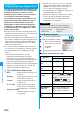
You can perform the following operations when you
play back or pause a PC movie using the Flat-plug
Stereo Earphone Set (option) or Flat-plug Earphone/
Microphone with switch.
Listening
8
p
Each time of pressing switches
in order of “OFF”
→
“Surround”
→
“Natur1”
→
“Natur2”.
Equalizer
7
p
Each time of pressing switches
in order of “Normal”
→
“S-XBS1”
→
“S-XBS2”
→
“Train”.
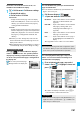
Operation Key operation
Operation Switch operation
Pause Press the switch once. To play
back, press it again.
Play back next file Press the switch twice in
succession.
Play back previous file Press the switch three times in
succession. When playback time is
over three seconds, this operation
returns the position to the
beginning of the file.
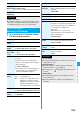
■
Specification for PC movie playback
You might be able to play back the files that exceed the bit
rates described above.
p
Even when the file format is supported, you might not be able
to obtain files, play back during obtaining, or play back after
obtaining depending on the file.
p
If the file format of either video or audio is not supported, the
file might be played back with the supported format only.
■
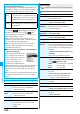
Icons on the PC Movie List
p
Above icons are displayed only for “Position memory” or
“Played history”.
File format WMV, WMA, WVX, WAX, ASF, ASX
Extension wmv, wma, wvx, wax, asf, asx
Codec Video Windows
®
Media Video8
through 9
Audio Windows
®
Media Audio2
through 9
Bit rate Video only 512 kbps
Voice only 192 kbps
Video + Voice 512 kbps + 64 kbps
Video size
QVGA (sidewise 320 dots x lengthwise 240 dots)
Frame rate 30 fps
Information
p
Files with the extension of wvx, wax, asx are the files for
which the URL of a PC movie on the Internet is specified.
When you select those files saved on the microSD memory
card, streaming or downloading playback starts from the
specified URL.
Icon File format
WMV, ASF
WVX, ASX
WMA
WAX
Icon Description
Resides on the Internet.
Saved to the microSD memory card.
ᵡᶍᶌᶒᶇᶌᶓᶃᶂ