
User's Manual Part 2




266
Full Browser/PC Movie
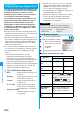
You can save the obtained PC movies to the microSD
memory card. However, you cannot save the streaming
type of PC movies.
1
Obtaining Completion display
Save
YES
The PC movie is saved to the folder selected by “Select
storage”.
p
When the maximum number of files has already been
saved to the microSD memory card or memory space is
full, the confirmation display appears asking whether to
delete unnecessary files to save new one. Select “YES”
to list the files in Data Box, and select the unnecessary
files to delete them. Before deleting, you can play back
PC movies on the microSD memory card for
confirmation, but cannot display the previous or next
files.
■
When obtaining a PC movie is suspended
Depending on the type of a PC movie being obtained, the
operation differs.
Streaming type
After the suspension, the obtaining will be in pause state.
Press
Oo
( ) to resume playback from the suspended
point.
Download type
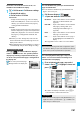
After the suspension, the Obtaining
Completion display appears. Select
“Play” to play back the obtained
segments of the file. Select
“ResumeDL” to resume obtaining
from the suspended point.
p
Depending on the PC movie or the
site you are connecting to, you cannot resume from the
suspended point even by pressing
Oo
() or
selecting “ResumeDL”. In that case, the obtaining resumes
from the top of the file.
Information
p
Note that there is no upper size limit for a streaming type of
PC movie, you might exchange the files of no size limit.
When obtaining it, the confirmation display appears asking
whether to play it back.
p
Depending on the site or PC movie you are connecting to,
you might not be able to obtain a file, play it back during
obtaining, or play it back after obtaining.
p
Depending on the line speed, line state, or radio wave
conditions, the playback during obtaining might be
suspended or the images might blur. You can repeatedly
play back the download type of PC movies after obtaining
but cannot play back the streaming type of PC movies.
Saving PC Movies
Information
p
You cannot attach the saved PC movie to an i-mode mail
message for sending.
You can play back moving images published on the
Internet for personal computers or PC movies saved to
the microSD memory card via a personal computer, etc.
p
You can play back the sound of moving images from a
commercial Bluetooth device. (See page 352)
1
m
Data box
PC Movie
2
microSD
Select a folder
Select a file.
p
When you press and hold
p
for at least one second
during playback, pause, or halt, or press
h
, PC
Movie Player ends. It ends even when you play back
during obtaining.
■
Operations while playing back a PC movie
p
See page 269 for when you operate from the Function menu.
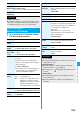
PC Movie Player
Playing Back PC Movies from
Data Box
<
>
PC Movie Type
Selection display
PC Movie Folder List PC Movie List
Operation Key operation
Pause
※1
Oo
() or
p
pOo
() or
p
to play back
Fast forward
※1
l
()
pl
( ) to play back
Display next file
※2※3
Vo
Display previous file
※2※3
Co
※4
Select position to play
※1※5
Press and hold
No
.
Sound volume
adjustment
B
o
or
<
/
>
p
Press and hold to adjust the
sound volume sequentially.
p
Available for set to from Level
0 (Silent) through 25
Mute
i
()
pi
( ) or adjust the
sound volume to play back
sound
Switch vertical display/
horizontal display
※6※7
c
()
p
Each time of pressing
switches display direction.
Remaster
9
p
Each time of pressing switches
between “ON” and “OFF”.