
User's Manual Part 2




264
Full Browser/PC Movie
By using cookies, you can effectively access the
Internet web pages you have accessed once.
A cookie is the system to temporarily save personal
information such as the date/time or number of times
you accessed an Internet web page. The information
from the server is written into the FOMA phone,
temporarily saved, and used for content services.
p
If a cookie is sent, the information such as the date/time or
number of times you accessed an Internet web page is also
sent to the web page. Note that even if your information is
detected by a third party by sending a cookie, we cannot be
held responsible for that. However, you may not be able to
correctly display or use some Internet web pages or content
services unless the cookie setting is valid.
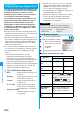
You can set whether to validate cookies.
1
i
Full Browser
Full Browser settings
Cookie setting
Select an item.
Valid
. . . . .Always validates cookies. A confirmation
display does not appear before a cookie is
sent or received.
Invalid
. . .Always invalidates cookies.
Notify (sending)
. . . . . . . . .Validates cookie’s sending/receiving. A
confirmation display appears each time
before a cookie is sent.
Notify (receiving)
. . . . . . . . .Validates cookie’s sending/receiving. A
confirmation display appears each time
before a cookie is received.
Notify (send/recv.)
. . . . . . . . .A confirmation display appears asking
whether to permit a cookie to be sent or
received each time before a cookie is sent or
received.
p
When you replace a UIM with another one, “Invalid” is
set. If you change the setting with the another one, the
display for entering your Terminal Security Code might
appear.
1
i
Full Browser
Full Browser settings
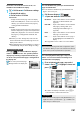
Delete Cookies
Enter your Terminal Security Code
YES
Cookie
Cookie Setting
Information
p
When “Notify” is set, the confirmation display might
consecutively appear asking whether to send/receive
(update) cookies depending on the Internet web page.
Delete Cookies
The referer denotes the link source information. When
a referer is sent, the information about from which page
you have accessed it is sent to the site.
Note that even if your information is detected by a third
party by sending a referer, we cannot be held
responsible for that.
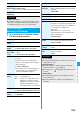
You can set whether to send a referer while an Internet
web page is open.
1
i
Full Browser
Full Browser settings
Referer setting
Select an item.
Send
. . . . . Sends a referer.
Unsend
. . . Does not send a referer.
Notify
. . . . When a referer is sent, the confirmation
display appears asking whether to send it.
Referer
Referer Setting
Information
p
When “Notify” is set, the confirmation display might
consecutively appear asking whether to send a referer
depending on the Internet web page.