
User's Manual Part 2




262
Full Browser/PC Movie
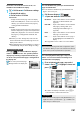
You can upload JPEG or GIF images stored in the
FOMA phone to an Internet web page.
p
Procedure for uploading images differs depending on the
Internet web page. Follow the instructions on the display.
You can switch to Full Browser to show the Internet
web pages incorrectly displayed by i-mode.
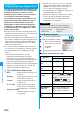
1
While a page to be shown in Full Browser is
displayed
i
()
Internet
Switch to FB
OK
Upload Images
Information
p
When the total size of the selected images exceeds 80
Kbytes, or when the total size of the selected image and
other files exceeds 100 Kbytes, you cannot upload the
images.
p
You may not be able to upload images depending on the
Internet web page.
p
You cannot upload the images whose output from FOMA
phone is prohibited.
Switch from i-mode to Full Browser
Information
p
You cannot correctly display some Internet web pages.
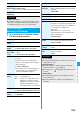
Function Menu of Full Browser Display
Function menu
Operation/Explanation
Add bookmark
See page 157.
Bookmark
See page 157.
Enter URL
You can enter a URL to display an Internet
web page.
Select a text box.
Go to step 2 of “Displaying Internet Web
Pages” on page 156.
p
The URL of displaying site is entered
beforehand.
Reload
The contents on the Internet web page is
updated to the latest ones.
Change disp.
mode
See page 261.
CHG wide scr.
mode
The image is displayed horizontally by
rotating the display 90 degrees to the right.
p
When it is already displayed horizontally,
the vertical display returns.
Open new
window
See page 261.
Change
window
You can switch the windows while displaying
the Internet web pages in multiple windows.
Select a window.
Close window
You can close the window while displaying
the Internet web pages in multiple windows.
YES
Save image
See page 159.
Add desktop
icon
See page 114.
Compose
message
You can compose an i-mode mail message
with the URL of the displayed Internet web
page pasted to the text.
Go to step 2 on page 172.
Home
(Set as home
URL)
You can set the displayed Internet web page
as Home URL.
Set as home URL
YES
Home
(Display
home)
You can display the Internet web page set as
Home URL.
Display home
Scroll
(Speed)
See page 263.
Scroll
(Focus while
scroll)
See page 263.
Zoom
See page 263.
All frames
You can return to the display for all frames
from the display for the enlarged frame.
Retry
You can play back the displayed animation
from the beginning.
Page info
You can display information of the displayed
Internet web page.
URL or Title
Others
(Set image
display)
You can set whether to display images.
Set image display
See page 263.
Others
(Change CHR
code)
See page 155.
Others
(Cookie setting)
You can set whether to validate cookies.
Cookie setting
Go to step 1 of “Cookie Setting” on page 264.
Others
(Delete Cookies)
You can delete cookies.
Delete Cookies
Go to step 1 of “Delete Cookies” on page 264.
Function menu
Operation/Explanation