
User's Manual Part 2




261
Full Browser/PC Movie
Two modes, “Phone mode” and “PC mode”, are
available for the Full Browser display.
1
i
Full Browser
Full Browser settings
Display Mode setting
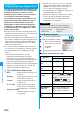
Phone mode or PC mode
Phone mode
. . . Displays an Internet web page to fit in the display
width of the FOMA phone. You do not need to scroll
sideways; you can browse Internet web pages by
scrolling upward and downward.
PC mode
. . . Displays an Internet web page in the same format as
when it is displayed on your personal computer in 800
(width) x 600 (height) dots. You can browse Internet
web pages by scrolling upward, downward, and
sideways.
p
Each time you select “Change disp. mode” from the
Function menu with an Internet web page shown, the
display modes switches.
p
When displaying in the horizontal display, “PC mode” is
set automatically, and you cannot change the setting.
Press
l
( ) from the Full Browser display to
switch to “Operation mode”. The operation palette is
displayed by switching to Operation Mode, then you
can move to the previous/next page or enlarge/reduce
the display size.
No
:Moves to the previous/next page.
Bo
:Enlarges/reduces the display size.
Switch Display Mode
Use Operation Mode
You can simultaneously open up to five Internet web
pages via Full Browser.
p
You can switch the simultaneously opened Internet web
pages to show one by one.
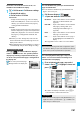
1
Full Browser display
i
()
Open new window
Select an item.
Bookmark
. . . Opens a new window to show an Internet
web page stored in Bookmark. (See
page 157)
Enter URL
. . . Opens a new window to show an Internet
web page by entering a URL. (See
“Displaying Internet Web Pages” on
page 156)
Home
. . . . . . . Opens a new window to show an Internet
web page set as Home URL.
Link
. . . . . . . . Opens a new window to show a page of
the link highlighted on the Full Browser
display.
p
See page 262 for how to switch or close the window.
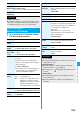
You can display Internet web pages composed of
frames. You can select a frame, and enlarge each
selected frame for displaying.
1
From an Internet web page composed of
frames
Press
Bo
to highlight a frame, and
press
Oo
().
p
To return to the display for all frames, press
r
or
select “All frames” from the Function menu.
Open Multiple Windows
Information
p
Some Internet web pages have links configured to open in
new windows. When you open such a link, the new window
opens even if you do not perform above operations.
Display a Page Composed of Frames
All frames Enlarged by frame
Information
p
When an Internet web page has many divided frames, you
might not be able to open all frames. “ ” is added to the
frames that you could not open.