
User's Manual Part 2




260
Full Browser/PC Movie
You can browse Internet web pages designed for PCs
using the Full Browser function. You can display even
the Internet web pages that cannot be correctly
displayed by i-mode. However, you cannot display or
correctly display some Internet web pages.
If you change the style while using Full Browser, the
display automatically switches between the vertical
display and the horizontal display. However, the
display might not switch automatically during data
communication or while a message is shown. When
you switch it manually, select “CHG wide scr. mode”
from the Function menu.
p
The data such as Home URL or Bookmarks registered via
Full Browser cannot be used via i-mode. The contents set by
Full Browser are invalid for i-mode, either.
p
Note that you are charged a high communication fee for the
massive data communication such as browsing Internet web
pages having many images or downloading data files. For
details on the packet communication fee, refer to “Mobile
Phone User’s Guide [i-mode]”.
p
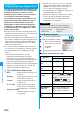
You can browse Internet web pages composed of frames.
You can select a frame to display it as well. (See page 261)
p
You can display SSL/TLS
※
-compatible pages via Full
Browser.
※
SSL and TLS are the methods of safer data
communication using authentication/encryption
technology to protect your privacy. SSL/TLS pages
prevent eavesdropping and information alteration during
communication by exchanging encrypted data files.
Further, server authentication prevents web spoofing, thus
making your personal information such as credit card
number or postal address exchanged safer.
1
i
Full Browser
Select an item.
Home
. . . . . . . . . .Displays an Internet web page set as
Home URL.
Bookmark
. . . . . .Displays an Internet web page stored
in Bookmark. (See page 157)
Last URL
. . . . . . .Displays an Internet web page you
viewed last time.
Go to location
. . .Displays an Internet web page by
entering a URL. (See “Displaying
Internet Web Pages” on page 156)
Full Browser settings
. . . . . . . . . . . . . . .Configures Full Browser settings.
(See page 263)
Full Browser
Displaying Web Pages Designed for PC
<>
p
When “Access setting” is set to “No”, the confirmation
display appears asking whether to start Full Browser.
Highlight “Yes” and select “OK” to switch setting of
“Access setting”, then Full Browser starts up.
p
To end Full Browser, press
h
with an Internet web
page displayed and select “YES”.
p
When no Home URL is stored and you select “Home”,
the message appears telling that no Home URL is
stored. Select “OK”, then the Home URL Storage
display appears. (See page 263)
…
: Displaying in multiple windows
…
Window number/Number of windows
…
:
During communication in another window
:
During communication in another frame
…
: Phone Mode
: PC Mode
…
: Displaying an enlarged frame
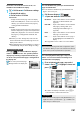
■
Operations for the Full Browser display
Information
p
It may take long to display some Internet web pages.
p
You cannot use the following functions on Full Browser:
・
Phone To function
・
Screen memos
・
Flash movies
・
PDF files
Full Browser Display
Full Browser Display
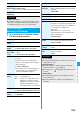
Operation
Key operation
Phone Mode PC Mode
Return to previous
page
Co
or
11
Forward to next
page
Vo
or
33
Scroll display
Bo Mo
Scroll display page
by page
<
/
>
or
m
()/
c
()
p
To scroll to the top/end of the page,
<
/
>
(for at least one second),
m
()/
c
() (for at
least one second) or
a
/
s
Reload
2
Enlarge/Reduce
display size
7
to reduce the display size
8
to display in standard size
9
to enlarge the display size
Display Bookmark
List
0