
User's Manual Part 2



253
One Seg
The recorded still images are saved to your FOMA
phone (“Data box”
→
“1Seg”
→
“Image” folder). You can
save up to 3,500 files in total including other data files,
however, the number of files you can save decreases
depending on the data volume. (See page 444)
p
See page 274 for displaying the recorded still image files.
p
You cannot save still images to the microSD memory card.
1
Viewer display
p
A confirmation tone sounds, and the still image is saved.
p
When the airwave reception level indicates “ ”, you
cannot record still images.
You can book programs or set timer recordings of One
Seg. At the specified date/time, an alarm sounds to
notify you of the start of the program.
p
You can book programs or set timer recordings also by using
the channel information displayed in the Program Guide
i-
α
ppli, sites, or mail.
You can book programs by setting the date/time,
channel, and program name. You can book up to 100
programs.
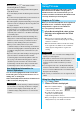
1
m
1Seg
Book program
l
()
Do the following operations.
p
Select a booked program to check the contents, and
you can edit it by pressing
l
().
Record Still Images
Information
p
The file name and title name of the saved still image are as
follows
:
File name: “YYYYMMDDhhmmXXXX”
Title name: “YYYY/MM/DD hh:mm”
(Y: year, M: month, D: date, h: hour, m: minute, X: numeral)
p
You cannot set the recorded still image for the Stand-by
display or the Call Receiving display.
p
See page 162 for when images are stored to the maximum.
p
Data broadcasting and caption cannot be saved as still images.
p
You cannot record still images during AV output.
Book Program Timer Recording
Booking Programs or Setting
Timer Recording of One Seg
Book Program
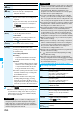
<>< >
Item Operation/Explanation
(Start date
setting)
Enter a date/time for starting watching.
Select an item.
Enter date
. . . . Enter a date/time directly.
Choose date
. . Select a date from the
Calendar and enter a time.
(Channel)
Select a channel.
2
Press
l
().
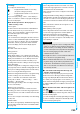
You can set timer recordings by setting the date/time,
channel, and program name. You can set up to 100
timer recordings.
1
m
1Seg
Timer recording
l
()
Do the following operations.
p
Select a set timer recording to check the contents, and
you can edit it by pressing
l
().
p
You can display the used memory space (estimate) by
pressing
i
().
(Edit title)
Enter a program name.
p
You can enter up to 48 full-pitch/96
half-pitch characters.
(Repeat)
Select a type of repeat.
p
If you select “1time”, the booking is not repeated.
p
If you select “Select day”, put a check mark
for days of the week to be set and press
l
().
p
The program booking set with repetition is
counted as one booking.
(Alarm)
Select an alarm method.
ON
. . . . . . . . . .Alerts you at the time set for
the start date/time comes.
The setting for alarm
notification is completed.
ON/Set time
. . .Alerts you at the time set as
the prenotification.
OFF
. . . . . . . . . .Does not alert. The setting for
alarm notification is completed.
Select how many seconds (minutes)
before the specified time to be alerted.
(Alarm tone)
Select a type of alarm tone
Select a folder
Select an alarm tone.
(Volume)
Use
Bo
to adjust the volume.
p
If you set to “Step”, the alarm tone is silent
for about three seconds, and then the
volume steps up every about three seconds,
from Level 1 through Level 6.
(Activate TV
w/ alarm)
If you set to “ON”, you can start One Seg
directly from the Booking Alarm Notification
display.
ON or OFF
Item Operation/Explanation
Timer Recording
Item Operation/Explanation
(Start date
setting)
Enter a date/time for starting or ending
recording. The booking alarm notification is
made about one minute before the starting time.
Select an item.
Enter date
. . . . . Enter a date/time directly.
Choose date
. . . Select a date from the
Calendar and enter a time.
(End date
setting)
ᵡᶍᶌᶒᶇᶌᶓᶃᶂ