
User's Manual Part 2



249
One Seg
Settings
(Brightness)
You can set the brightness of the display light
to Level 1 (dark) through 5 (bright).
Select a brightness level.
p
If you set to “Auto setting”, it is adjusted
automatically accordance with the ambient
brightness.
p
The setting here is valid until you finish
watching the One Seg program. The setting
at One Seg start-up follows the setting
specified by “Brightness” of “Backlight”
on page 107.
Settings
(Image quality)
See page 256.
Settings
(LCD AI)
See
page 107.
Settings
(Auto volume)
See page 256.
Settings
(Remaster)
See page 256.
Settings
(Listening)
See page 256.
Settings
(Equalizer)
See page 256.
Settings
(Main/sub
sound)
Sound
Main/sub sound
Main sound, Sub sound, or
Main+sub sound
Settings
(Switch audio
data)
Sound
Switch audio data
Sound 1 or Sound 2
p
You can switch only when audio that can be
switched is found.
Settings
(TV sound w/
closed)
See page 256.
Settings
(ECO mode)
See page 257.
Data
broadcasting
(Reload
contents)
You can reload the data broadcasting site
being displayed.
Reload contents
p
The confirmation display appears asking
whether to re-send the data you entered,
depending on the site.
Data
broadcasting
(Certificate)
See page 155.
Data
broadcasting
(Set image
display)
See page 164.
Function menu
Operation/Explanation
At One Seg
start-up
Main sound
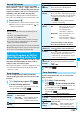
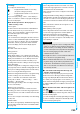
You can compose and send i-mode mail messages
while you are watching a One Seg program. (Multiple
Windows)
When you send an i-mode mail message to the FOMA
phone supporting the “Media To” function by “Recom.
channel mail”, the receiving end can start One Seg by
using the “Media To” function.
p
You cannot operate One Seg while the Message
Composition display is shown. You cannot display the
caption and data broadcasting, either.
p
When you switch to Horizontal Open Style while the
Message Composition display is shown, the Viewer display
only is displayed horizontally.
p
You can compose SMS messages while watching a One Seg program.
1
Viewer display
i
()
Compose message
Compose message
or Recom. channel mail
Compose message
. . . . . You can compose a new
i-mode mail message. Go to
step 2 on page 172.
Recom. channel mail
. . . You can compose an i-mode
mail message whose text
contains the information of the
channel you are watching. Go
to step 2 on page 172.
Data
broadcasting
(Sound effect)
See page 257.
Data
broadcasting
(Reset settings)
See page 257.
Back to data
BC
You can stop browsing the data broadcasting
site and return to the data broadcasting.
Tune service
You can select a program to watch when the
same broadcasting station is broadcasting
multiple services (programs).
Select a channel.
TVlink list
You can display the TVlink List. (See page 251)
AV output
See page 313.
Send i-mode Mail while Watching
Function menu
Operation/Explanation
Message Composition display
Viewer display
Information
p
Even when you show the Message Composition display/
detailed Sent Mail display by Multitask while you are watching
a One Seg program, the display appears in multiple windows.
ᵡᶍᶌᶒᶇᶌᶓᶃᶂ