
User's Manual Part 2




248
One Seg
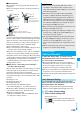
■
Operations while watching a One Seg program
※
1 In Data Broadcasting Mode, you cannot operate.
※
2 You cannot operate in Horizontal Open Style.
※
3 When you close the FOMA phone, the vertical display
returns. In Horizontal Open Style, the horizontal display
automatically appears; the vertical display does not appear.
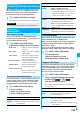
Operation Key operation
Sound volume
adjustment
Bo
※1
or
<>
p
Press and hold to adjust the sound
volume sequentially.
p
Available for setting to from Level 0
(Silent) through 25
Mute
r
※1
pr
※1
or adjust volume to play back
sound
※2
Start program
guide i-
α
ppli
l
()
※2
Program info
l
(for at least one second)
※2
Program info (outline)
m
()
Switch display
m
( ) while displaying program
information (outline)
p
Each time of pressing switches ON/OFF of
“Icon” and “Caption” in the horizontal display.
Vertical/
Horizontal
display
c
()
※1※2※3
p
Each time of pressing switches the
display direction.
Record video
Oo
()
※1
or
p
(for at least one second)
pOo
()
※1
or
p
to stop
Record still image
p
Switch TV/data BC
d
※2
p
Each time of pressing switches between
Video Mode and Data Broadcasting Mode.
Information
p
Even when you switch the display by using Multitask while
you are watching a One Seg program, the audio from the
One Seg program is played back. (Play Background) The
audio might not be played back, however, depending on the
function or program. (See page 419)
p
When “TV sound while closed” is set to “ON”, the audio is
played back even if you close the FOMA phone while you are
watching a One Seg program. You cannot do anything other
than adjusting the volume when your FOMA phone is closed.
p
The following might occur depending on the radio wave conditions:
・
The audio is interrupted.
・
The data broadcasting is not operable.
・
Block-shaped noise appears on the display or playing stops.
・
The video or the data broadcasting is not displayed. (A dark
screen appears.)
p
The caption might not be displayed depending on the program.
p
The data broadcasting cannot be displayed in the horizontal display.
p
If you move, the receivable airwaves or broadcasting
stations might change being affected by mountains or
buildings. If reception on One Seg goes bad after moving,
perform “Auto channel setting”; then reception might be
improved via different airwaves or you might be able to
watch programs of other broadcasting stations.
p
If you use Channel Search to select a channel after you
move, etc,. you might be able to find the channel you could
not register by “Auto channel setting”. Execute “Add to ch.
list” to register the channel you found, and then you can
watch the channel from the next time.
p
When starting One Seg or switching channels, it takes a
while before you can watch a One Seg program.
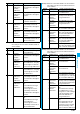
Function Menu of Viewer display
Information
Function menu
Operation/Explanation
Channel info
You can display the detailed display of the
selected channel list. Select a broadcasting
station to switch to it.
Program info
You can display information of the program
you are watching.
p
When you have not obtained program
information, it is not displayed.
Channel list
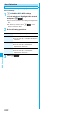
Go to step 1 of “Select Channel List” on page 246.
Channel setting
See page 245.
Add to ch. list
You can add the broadcasting station you are
currently watching to the channel list.
YES
p
The broadcasting station is registered to the
lowest number of an unoccupied
remote-control number from 13 onward.
Program guide
See page 250.
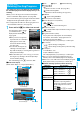
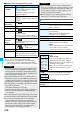
Switch display
You can switch the contents of the Viewer
display.
Select an item.
p
If you set to “Enlarged V. img+DBC”, the
video in the vertical display is enlarged.
However, the sides of the video might be cut
depending on the program.
p
Even if you set to “Data broadcasting”, the
audio from One Seg program is played
back.
Switch TV/
data BC
You can switch between Video Mode and
Data Broadcasting Mode while watching a
One Seg program in the vertical display.
Icon
See page 257.
Compose
message
See page 249.
At One Seg
start-up
When “Caption”
is set to “ON”:
V. img+Caption
+DBC
When “Caption”
is set to “OFF”:
Visual
image+DBC
At One Seg
start-up
Video Mode