
User's Manual Part 2




246
One Seg
2
YES
Enter a title.
p
You can enter up to 11 full-pitch/22 half-pitch
characters.
p
When you press
Oo
( ) without entering a title,
the title name takes the name of “YYYY/MM/DD
hh:mm”. (Y: year, M: month, D: date, h: hour, m: minute)
p
To cancel searching midway, press
l
() or
r
; then select “YES”. You can register the searched
broadcasting stations in a channel list.
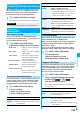
You can register the broadcasting stations set by
prefecture to a channel list.
1
m
1Seg
Channel setting
Select area
Select an area
Select a prefecture
YES
p
From the Channel List display or Viewer display, press
i
( ), select “Channel setting”, and select
“Select area”.
Information
p
When the multiple broadcasting stations which have the
same remote-control number are retrieved, the message to
the effect that the remote-control number is doubled
appears. Select “OK” and select your area from the Local
Area Selection display. The channels in the area you select
are preferentially assigned to remote-control numbers 1 to
12, and channels in the area you do not select are assigned
to remote-control numbers 13 onward.
p
The time to search channels requires for about 30 to 60
seconds. However, it differs depending on the number of
broadcasting stations or airwave condition, and 60 seconds
might be exceeded.
Select Area
Information
p
Depending on the area, you may not be able to correctly
register the broadcasting stations by “Select area”. In that
case, search for the broadcasting stations by “Auto channel
setting.”
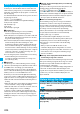
You can select a channel list to set the broadcasting
stations you receive.
Also, you can edit the channel list already registered.
1
m
1Seg
Channel list
Select a channel list.
The channel list you receive is set, and the detailed
display appears.
p
Select a broadcasting station to watch a One Seg program.
p
When you select “Channel list” from the Function menu
of Viewer display, the Viewer display returns by
selecting a channel list.
p
You can watch a One Seg program also by pressing
l
( ) from the Channel List display and
selecting a broadcasting station.
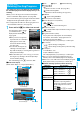
Select Channel List
Channel List display Detailed Channel List
display
Remote-control number
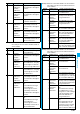
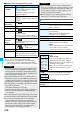
Function Menu of the Channel List Display
Function menu
Operation/Explanation
Channel
setting
See page 245.
Edit title
Enter a title.
You can enter up to 11 full-pitch/22 half-pitch
characters.
Delete this
YES
p
You cannot delete the channel list currently set.
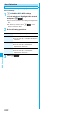
Function Menu of the
Detailed Channel List Display
Function menu
Operation/Explanation
Remote
control No.
You can change the broadcasting station set
for the remote-control number.
Select a broadcasting station you want
to change
Select the remote-control
number to be set.
p
If any broadcasting station has already been
set for the specified remote-control number,
the broadcasting stations switch positions.
Repeat the operation to set a broadcasting
station for a remote-control number.
l
()
YES
Delete this
YES
p
When you delete all the broadcasting stations in
the channel list, the channel list itself is deleted.
p
You cannot delete the broadcasting station
in the channel list currently set.