
User's Manual Part 2




245
One Seg
■
One Seg antenna
When you watch a One Seg program, fully extend the One
Seg antenna.
p
When you change the direction of the One Seg antenna, do
not force it.
■
Battery level
If you try to start One Seg with the battery level low, the battery
alert tone sounds, and the confirmation display appears asking
whether to start it. Also, when the battery level becomes low
while you are watching or recording a One Seg program, the
battery alert tone sounds, and the confirmation display
appears asking whether to end One Seg.
p
When you do nothing from the confirmation display for about
one minute, One Seg automatically terminates.
p
While “Rec. when low battery” is set to “ON”, the confirmation
display does not appear during recording. (See page 256)
p
If the battery level becomes low during recording and recording
ends, the video recorded up to that point is automatically saved.
p
During Multitask, the battery alert tone sounds but the
confirmation display does not appear. Switch to the Viewer
display and then operate.
■
When calls etc. come in while you are watching or
recording a One Seg program
When the events shown below occur while watching or recording
a One Seg program, the video and audio are suspended, and
each function works. Recording is not suspended.
After you finish each function, you can resume watching a One
Seg program. See page 250 for receiving i-mode mail or SMS
messages.
p
Incoming voice call
p
Incoming video-phone call
p
Incoming PushTalk call
p
Receiving i-mode mail, SMS, Message R/F
(when “Receiving display” is set to “Alarm preferred”)
p
Notification of Alarm, Schedule, ToDo, Book Program
(when “Alarm setting” is set to “Alarm preferred”)
p
Notification of Timer Recording
(When the start date/time comes, the FOMA phone works
according to the setting of “Priority”.)
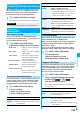
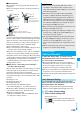
Pull the One Seg
antenna out
as far as it goes.
Change the direction
of the One Seg antenna
without applying pressure.
Retract the One Seg antenna by
holding the lower part until it is held back.
To watch One Seg programs, you need to execute
Channel Setting and to select a channel list in advance.
You can store up to 10 channel lists.
p
The broadcasting stations you can receive are different
depending on the local area. If you register a channel list of
the area for travelling or business trip, you can watch
programs in the area just by selecting the channel list.
p
The remote-control numbers you use with channel selections
are previously set for respective broadcasting stations.
p
You cannot execute Channel Setting during recording a One
Seg program.
You can automatically search for the broadcasting
stations that you can currently watch in your area, and
then register them to the channel list.
p
Perform the setting with the One Seg antenna extended
within the terrestrial digital TV broadcasting service area.
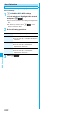
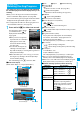
1
m
1Seg
Channel setting
Auto channel setting
YES
Searching takes place.
p
From the Channel List display or Viewer display, press
i
( ), select “Channel setting”, and select “Auto
channel setting”.
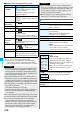
Information
p
When you have not inserted the UIM, when you have
canceled the contract with DoCoMo, or when you have
temporarily suspended using the FOMA service, you cannot
watch One Seg programs.
p
Even when you have inserted the UIM contracted with
DoCoMo, you might be disabled to start One Seg if you
repeatedly watch One Seg programs in the condition the
FOMA phone cannot communicate such as when you are
out of the service area. In that case, try to start One Seg in
the condition the FOMA phone can communicate such as
by moving into the FOMA service area.
p
When you watch a One Seg program for the first time, start
One Seg in the FOMA service area.
p
One Seg is not available while “USB mode setting” is set to
“microSD mode” or “MTP mode” and the FOMA phone is
connected to a personal computer.
p
One Seg might automatically start when you end a call by
closing the FOMA phone during a call. In such a case, be
careful not to use the FOMA phone close to your ear
because audio is played back at the sound volume for One
Seg.
p
The life of battery pack may shorten if you watch One Seg
programs for a long time during charging.
Channel Setting
Setting Channels
Auto Channel Setting
<>
ᵡᶍᶌᶒᶇᶌᶓᶃᶂ