
User's Manual Part 2




242
GPS Function
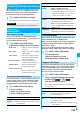
You can use this setting for changing the host for
Service Settings.
1
m
LifeKit
GPS
GPS settings
Host selection
Highlight <Not stored>
and press
l
().
p
If you select a stored host, the setting is changed to that
host.
p
To delete a stored host, press
i
( ), select
“Delete” and select “YES”.
2
Do the following operations.
3
Press
l
().
Host Selection
※
Normally, you do not need to change this setting.
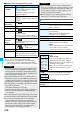
Item Operation/Explanation
Host name
Enter a host name.
p
You can enter up to 9 full-pitch/18 half-pitch
characters.
Host number
Enter a host number.
p
You can enter up to 99 half-pitch
alphanumeric characters.
Host address
Enter a URL.
p
You can enter up to 100 half-pitch
alphanumeric characters.