
User's Manual Part 2




240
GPS Function
2
Press
l
().
Phone
number
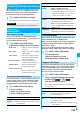
Enter a phone number.
p
You can enter up to 26 digits.
p
Highlight the phone number field, press
i
( ), and select “Enter from PB” to
call up a phone number from the
Phonebook and enter it.
p
If you enter a phone number by “Enter from
PB” with “Service client name” not entered,
the name for the Phonebook entry is
entered.
Notify when
dialing
You can set whether to notify of your current
location for when you make a voice call or
videophone call to the stored phone number.
ON, OFF or Confirm every dial
p
To check each time you make a call, select
“Confirm every dial”.
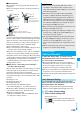
Item Operation/Explanation
Information
p
Even if “Notify when dialing” is set to “ON” or to “Confirm
every dial”, you cannot notify of your current location when
you make a call without notifying of your caller ID.
Function Menu while LCS Client is Displayed
Function menu
Operation/Explanation
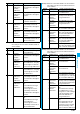
Delete
(Delete this)
Delete this
YES
Delete
(Delete all)
Delete all
Enter your Terminal Security Code
YES
Add to
phonebook
You can store the service client name and
phone number stored in “Reg. LCS client” into
the Phonebook.
YES
Go to step 1 on page 84.
Edit
Go to step 1 of “Register LCS Client” on
page 239.
p
You can edit also by pressing
l
().
Send Ir data
See page 305.
Send all Ir
data
See page 305.
transmission
See page 306.
All
transmission
See page 307.
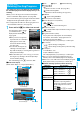
You can set whether to accept a location provision
request (provide location information). You can set
validity period as well.
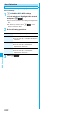
1
m
LifeKit
GPS
GPS settings
Location request menu
Enter your Terminal Security Code
ON, OFF or Permission schedule
2
Do the following operations.
3
Press
l
().
■
Operations when the validity period for location
provision is specified
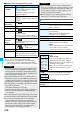
Example: When the current date and time are 12:00/15/Nov/
2007 and you set 14:00 as the start time and 21:00
as the end time
Location Request Menu
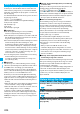
Item Operation/Explanation
Permit from
Enter the time for starting permission.
Permit to
Enter the time for ending permission.
Repeat
Select a repeat type.
p
When you select “1 time”, the permission
period does not repeat.
p
When you select “Select day”, put a check
mark for days of the week to be repeated,
then press
l
().
Validity period
When you set to “Repeat”, you can set the
period to be valid.
ON or OFF
Enter a validity date (from).
ON or OFF
Enter a validity date (to).
Information
p
You can set “Location request menu” also by “Initial setting”
(see page 45).
p
When “ON” is set, the location information might be sent
without any operation on the FOMA phone, and might be
notified to the searcher.
p
When “OFF” is set, the location provision is rejected even if
its location provision request is received. The history is not
stored.
p
You can specify from January 1, 2007 through December
31, 2037 for “Permission schedule”.
Repeat Validity period
Period of location provision
1 time - 14:00/15/Nov/2007 through
21:00/15/Nov/2007