
User's Manual Part 2







238
GPS Function
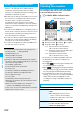
You can notify a service provider of your current location.
1
m
LifeKit
GPS
Notify of location
Direct input
Enter a party to be notified
YES
p
You can enter up to 12 digits by using numerals, # and
:
.
p
If you have stored LCS clients by “Reg. LCS client”
beforehand, you can select an LCS client from “View
service clients”.
p
You can press
l()
to stop measuring, but your
current location might be notified depending on the timing.
2
OK
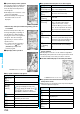
Up to 50 histories of Position Location, Notify Of
Location, and Provide Location are stored.
1
m
LifeKit
GPS
Location history
Select a location history.
Position location
Provide location
Notify of location
Notify of Location
Notifying Location Information
<>
Information
p
Even when you send your location information, it might not
be delivered to the service provider depending on the radio
wave conditions.
p
You are charged a fee for using the function to notify your
current location.
p
To use Notify Of Location, you might need to subscribe to a
service provider that supports Notify Of Location. Further,
you might be charged a fee for using the service.
p
You cannot enter any digits during Keypad Dial Lock.
p
Regardless of the mode of 2in1, your location information is
notified by Number A.
p
For using the service, refer to the information on your
service provider or the DoCoMo web page.
Location History
Displaying Location Information History
<>
Information
p
When the location histories exceed 50, they are
automatically overwritten from the oldest one.
p
The location information and accuracy stored in Location
History may differ from the ones sent to the location
provision requester or LCS client depending on the radio
wave conditions, and others.
p
When you cancel Position Location midway, you fail to
measure your current location, or you set “Location request
menu” to “OFF”, its history is not stored in Location History.
p
Even when the histories of Provide Location or Notify Of
Location are stored, they might not have been delivered to
your service providers.
p
You cannot operate other than “Compose message”,
“Dialing”, “Delete this” and “Delete all” for a failed-to-
measure history of Provide Location or Notify of Location.
p
When Provide Location was used, the name of the location
provision requester is checked against the Phonebook
entries which appear in each mode of 2in1 and then shown.
p
“ ” is displayed for the records of successful positioning.
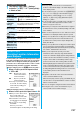
Function Menu while Location History is Displayed
Function menu
Operation/Explanation
Read a map
You can display a map by connecting a map
site.
YES
p
After displaying the map, you can use
“i-area” to search for the information of the
surrounding area. For details on “i-area”,
refer to the DoCoMo web site.
Run
i
α
ppli
You can use the current location information
on a GPS compatible i-
α
ppli program.
Select an i-
α
ppli program.
Paste to mail
You can paste the location information
converted to a URL to text and compose
i-mode mail.
YES
Go to step 2 on page 172.
Add to
phonebook
You can store the location information in the
Phonebook.
YES
Go to step 1 on page 84.
Attach to
image
You can store the location information in the
image.
Go to step 1 of “Displaying Images” on
page 274.
Compose
message
You can compose i-mode mail messages to
your location provision requester.
Go tostep 3 on page 172.
Dialing
See page 148.
Delete
(Delete this)
Delete this
YES
Delete
(Delete all)
Delete all
Enter your Terminal Security Code
YES
Information