
User's Manual Part 1





50
Voice/Videophone Calls
You and the other party can talk viewing each other’s
images.
DoCoMo videophones conform to 3G-324M, standardized by
the international standard 3GPP. You cannot connect to the
videophone that uses a different format.
p
3GPP (3rd Generation Partnership Project):
This is the regional standards organization for developing
common technical specifications for third-generation mobile
telecommunication systems (IMT-2000).
p
3G-324M:
This is the international standard for the third generation of
mobile videophones.
p
The P905i supports only 64 kbps communication speed of
videophone dialing. You can talk but cannot make a
videophone call at 32 kbps communication speed.
■
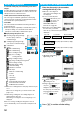
Display during videophone calls
…
Receiving image (Image through
the other party’s camera or
substitute image)
…
Sending image (Image through
your camera or substitute image)
…
Call duration
…
Status
: 64K communicating
: 32K communicating
: Voice sending/receiving
(gray): Voice sending/
receiving failed
※1
: Image sending/receiving
(gray): Image sending/receiving failed
※2
: Camera image sending
: Substitute image sending
: Chara-den talking
: Hands-free activated
: AV output
: Bluetooth communicating
: Portrait
: Close-up
: Landscape
: Night Mode
: Chara-den Whole Action Mode
: Chara-den Parts Action Mode
: DTMF Transmission Mode
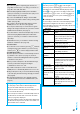
※
1 When voice sending fails, the other party cannot hear your
voice.
When voice receiving fails, you cannot hear the other
party’s voice.
※
2 When image sending fails, the sending image is not
displayed at the other end.
When image receiving fails, the receiving image is not
displayed.
When voice or image sending/receiving fails, it does not
recover automatically. You need to make a videophone call
again.
About Videophone
1
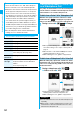
Enter the other party’s phone number,
starting with the city code.
p
When 27 or more digits are
entered, the lower 26 digits only
are displayed.
p
To store an entered phone
number in the Phonebook, press
m
( ). Go to step 2 of
“Storing Displayed Phone
Number/Mail Address in
Phonebook” on page 88.
p
Even when you are dialing within
the same area, you need to
enter the city code before the phone number.
<Example>
p
To make calls to mobile phone
p
To make calls to PHS
2
Press
d
or
Oo
().
p
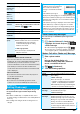
“ ” blinks during dialing, and
lights during a call.
Press
l
().
p
“ ” blinks during dialing and
lights during the call.
p
During a videophone call, you
can press
m
() to
display the substitute image at
the other party. To resume the
image through your camera,
press
m
( ) again.
3
Press
h
to end the call after talking.
Making a Call/Videophone Call
City code Local code Phone number
03
XXXX
XXXX
090
−
XXXX
−
XXXX
080
−
XXXX
−
XXXX
Other party’s phone number (11 digits)
070
−
XXXX
−
XXXX
Other party’s phone number (11 digits)
When Making a Voice Call
When Making a Videophone Call
The digital communication
charging starts from this
display.