
User's Manual Part 1






25
Before Using the Handset
i
i-mode key/i-
α
ppli key
・
For showing the i-mode menu (See page 152)
・
For operating the function corresponding to the navigation
displays (See page 27)
<Press and hold for at least one second>
・
For showing the i-
α
ppli Software List (See page 211)
c
Camera key/One Seg key
・
For activating a camera in “Photo mode” (See page 139)
・
For switching the camera mode while a camera is
activated (See page 143)
・
For operating the function corresponding to the navigation
displays (See page 27)
<Press and hold for at least one second>
・
For starting One Seg (See page 247)
h
Power/End key
・
For ending calls
・
For ending respective functions
・
For turning on the power (for at least one second)/For
turning off the power (for at least two seconds)
(See page 44)
Numeric keys
・
For entering phone numbers and text
ps
(for at least one second)
For activating Manner Mode (See page 102)
pa
(for at least one second)
For activating Public Mode (Drive Mode) (See page 65)
p1
(for at least one second)
For measuring your current location and executing the
GPS function (See page 232)
p5
(for at least one second)
For switching the backlight on/off (See page 107)
x
Multi key
・
For showing the Multitask menu (See page 333)
<Press and hold for at least one second>
・
For showing the display for setting “Switch 3G/GSM” (See
page 390)
・
For switching functions, when multiple functions are
running (See page 333)
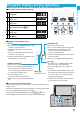
Hook for Horizontal Open Style
Connector terminal
・
For connecting the AC adapter (option), DC adapter
(option), or FOMA USB Cable with Charge Function 01
(option)
Call/Charging indicator
・
Flickers for incoming calls/mail and during a call.
(See page 111)
・
Lights in red during charging.
Private window
(See page 30)
One Seg antenna
・
For receiving One Seg broadcasting (See page 245)
Outside camera
・
For shooting portraits and/or landscapes (See page 133)
・
For catching sight of persons and/or landscapes during a
videophone call
Speakers
・
For sounding ring tone
・
For listening to the other party’s voice through this
speaker when Hands-free is activated (See page 60)
FeliCa mark
・
The IC card is mounted.
p
Use the IC card function placing this mark over the
scanning device. You cannot dismount the IC card.
(See page 225)
FOMA antenna
p
The FOMA antenna is embedded in the FOMA phone. Do
not cover the antenna with your hand for better
communication.
Photo light
・
Flickers when you shoot with a camera.
・
Used for shooting in a dark place. (See page 143)
microSD memory card slot
・
For inserting microSD memory card (See page 293)
!
Back cover
・
Remove this when attaching/removing the battery pack,
UIM, and microSD memory card. (See page 38, page 41
and page 293)
p
Do not peel off the black sticker on the back of the back
cover. If you peel it off, you might not be able to read and
write the IC card.
"
Charging terminals
#
Strap hole
$p
PushTalk key
・
For making/receiving PushTalk calls (See page 76 and
page 78)
・
For showing the PushTalk Phonebook (See page 79)
<Press and hold for at least one second>
・
For activating “MUSIC Player” (See page 323)
%<
Side upper key
・
For scrolling up page by page
<Press and hold for at least one second with the FOMA
phone opened>
・
For activating 2in1 (See page 372)
&>
Side lower key
・
For scrolling down page by page
・
For using Record Message (See page 68)
・
For checking for missed calls and new mail
(See page 112)
<Press and hold for at least one second with the FOMA
phone closed>
・
For activating Manner Mode (See page 102)
'
Earphone/Microphone/AV output terminal
(See page 312 and page 346)
(
One-push open button
(See page 26)
)
Horizontal open lever
(See page 26)