
User's Manual Part 1






134
Camera
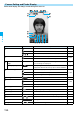
On the Finder display, the settings are indicated by bars and icons.
Camera Setting and Finder Display
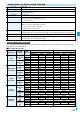
Icon/bar name Icon Description Page
Camera mode
Photo mode P.139
Movie mode P.141
//
Continuous mode (Auto, Manual, Auto bracket) P.139
Store in
Phone: Stores in the FOMA phone.
P.144
microSD: Stores on the microSD memory card.
Number of recordable
image
—
Number of remaining recordable still images
Up to 999 images are displayed.
—
Memory capacity bar
Memory usage state (estimate) in Movie mode
Displayed in red when the memory space reaches maximum.
—
File size setting
Mail restrict’n (S): Up to 500 Kbytes can be saved.
P.143Mail restrict’n (L): Up to 2 Mbytes can be saved.
Long time: Long time recording is possible.
Focus guide
Focus guide —
Focus
Auto
P.144Close-up
Landscape
Photo light
Photo light on P.143
Shooting status
During moving image recording P.141
Movie type set
Records only the video. P.145
Recordable time —
Recordable time (estimate) for moving images —
Top icon
Shows the vertical direction of the still or moving image.
—
Zoom bar
Zooming status P.142
Brightness
〜
Brightness of shot image P.143