
User's Manual Part 1



103
Sound/Screen/Light Settings
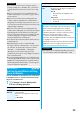
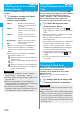
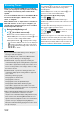
You can select one of three types of operations for Manner Mode.
■
Operations during Manner Mode
※
1 Vibrator works instead of (or with) the following tones:
Ring tone and alarm for “Alarm”, “Schedule”, “ToDo”, “Book program” and “Timer recording”
The vibration pattern will be the same as the setting described on page 100. However, if the setting described
on page 100 is “OFF”, “Pattern 2” will be activated.
Confirmation tone for checking missed calls and new mail
・
Vibrates for about 1 second when you have missed calls or new mail messages.
・
Vibrates for about 0.2 second when you have no missed calls and new mail messages.
※
2 When “Prefer manner mode” on page 335 is set to “OFF”, the alarm tone sounds at the volume set for Alarm.
※
3 The tone sounds at Level 1 when
①
is “Silent”.
※
4 The tone sounds at Level 2 when
①
is “Step”.
※
5 The tone sounds at Level 1 when
①
is not “Silent”.
※
6 The tone sounds at Level 6 when
①
is not “Silent”.
※
7 The tone does not sound when
①
is “Step”.
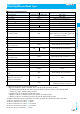
+m-2-0
Manner Mode Set
Selecting Manner Mode Type
Manner Mode Super Silent Original
Record message Set value of Record message ON or OFF
Vibrator
※1
ON ON or OFF
Phone volume Silent Silent through Level 6 and step
①
Mail volume Silent Silent through Level 6 and step
②
Alarm volume
※2
Silent Silent through Level 6 and step
VM tone ON OFF ON or OFF
③
Keypad sound OFF ON or OFF
④
Microphone sensitivity Up Normal or Up
Low voltage alarm tone
(Low battery alarm) OFF
ON or OFF
When “LVA tone” is set to “ON”, it works with
the same set value as
①
※3
Confirmation tone for selecting ring tone Silent
Works with the same set value as
①
・
②
On hold tone Silent
Works with the same set value as
①
※4
Holding tone Silent
Works with the same set value as
①
※5
ToruCa obtained tone and ToruCa
failed-to-obtain tone
Silent Works with the same set value as
①
Confirmation tone for recording voice
announce
ON OFF Works with the same set value as
③
Battery level tone Silent Silent
Voice recognition start tone Silent Silent
Confirmation tone for checking missed
calls and new mail
Silent
Works with the same set value as
①
※6
Warning tones Silent Works with the same set value as
④
Schedule alarm Silent Works with the same set value as
①
Alarm for Book program Silent Works with the same set value as
①
Alarm for Timer recording Silent
Works with the same set value as
①
※7
Start tones for shooting still and moving
images
Level 4 Level 4
Confirmation tone for selecting shutter
sound
OFF Works with the same set value as
③
Switching to Hands-free by
“Hands-free w/ V. phone” or
“Hands-free w/ PushTalk”
OFF OFF
Read aloud volume
Silent
Works with the same set value as
“Read aloud volume” on page 333
<>
ᵡᶍᶌᶒᶇᶌᶓᶃᶂ