
User manual


Wi-Fi
®
card by palmOne 50
CHAPTER 4 Managing Wi-Fi® Network Connections
Editing Wi-Fi network settings
Once you set up a network on the handheld, you can change the settings at any time. For example,
you can change the network name, add or edit WEP encryption settings, or change the IP or DNS
address.
0
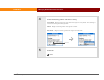
1 In the Applications/Home screen , select Prefs , and then select Wi-Fi.
2 Select the network:
a. Select Edit Networks from the Network pick list.
b. Select the network in the list, and then select Edit. If the network does not
appear in the list, select Add and enter the network name (SSID).
Continued
Edit Networks