
User manual


Wi-Fi
®
card by palmOne 46
CHAPTER 4 Managing Wi-Fi® Network Connections
Setting up a peer-to-peer (ad hoc) network connection
Your can connect your handheld directly to another Wi-Fi device, such as a laptop computer or
another handheld. The devices automatically negotiate a communications channel and
IP addresses, so you don’t need to enter this information unless you want to use a specific channel
or IP address
. You can only set the Wi-Fi channel manually when you are setting up a peer-to-peer
(ad-hoc) network. The Wi-Fi channel is automatically determined when using access point
(infrastructure) network access.
0
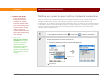
1 In the Applications/Home screen , select Prefs , and then select Wi-Fi.
2 Select the network you want to connect to:
a. Select the Network pick list and select Edit Networks.
Continued
Before You Begin
[ ! ]
If you are joining an
existing peer-to-peer
network, you need to
know the network SSID.
If you are initiating a peer-
to-peer network, simply
make up your own
network SSID and tell the
others who will be joining
your network.
»
Key Term
Peer-to-peer (ad hoc)
network Two or more
computers or devices
that communicate
directly with each other
using Wi-Fi, without
going through a wireless
access point or a wired
network.
Edit Networks