
User manual




Wi-Fi
®
card by palmOne 40
CHAPTER 4 Managing Wi-Fi® Network Connections
A green LED indicator on the front of the Wi-Fi card glows steadily if the card is properly
inserted in the SDIO slot and Wi-Fi is turned on. The LED indicator blinks when the connection to
an access point is being negotiated, and turns off when Wi-Fi is turned off.
Viewing signal strength
You can monitor the strength of your Wi-Fi signal when you are connected to a network. If the
signal is weak, expect the connection to be unreliable.
0
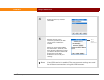
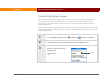
1 In the Applications/Home screen , select Prefs .
2 Select Wi-Fi.
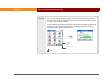
The signal bar shows the signal strength for the selected network.
Red Indicates a weak signal.
Yellow Indicates a medium-strength signal.
Green Indicates a very strong signal.
Continued
NOTE