
User manual




Wi-Fi
®
card by palmOne 38
CHAPTER 3 Using a VPN Account
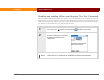
Disabling and enabling VPN on your Tungsten T3 or Zire 72 handheld
You can disable VPN whenever you don’t want to use your VPN account for network connections.
For example, you may find it faster to browse the public Internet without connecting through your
VPN account and private LAN. Or you may need to disable VPN in order to send personal email if
this activity is not permitted by your private LAN security.
0Y
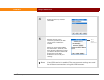
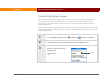
1 Go to the Home screen and select Prefs , and then select VPN.
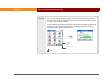
2 Select the VPN pick list and select
Disabled (or Enabled). Then
select Done.
VPN service is disabled (or enabled) for future connections.
Done