
User manual




Wi-Fi
®
card by palmOne 35
CHAPTER 3 Using a VPN Account
Switching between VPN accounts on your Tungsten T3 or
Zire 72 handheld
If you have set up multiple VPN accounts, you can easily switch from one to the other.
0
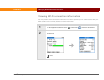
1 Go to the Home screen and select Prefs , and then select VPN.
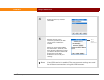
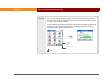
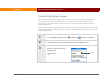
2 Select the VPN account:
a. If VPN is disabled, select
Enabled from the VPN pick
list.
b. Select the account from the
Account pick list.
c. Select Done.
The selected VPN service is enabled and is used for future
connections.
Account pick list
Done