
User manual




Wi-Fi
®
card by palmOne 34
CHAPTER 3 Using a VPN Account
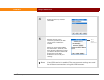
4 Select OK.
5 Enable the VPN account:
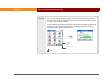
a. Select VPN Prefs.
b. Select Enabled from the VPN pick list.
c. Select Done twice.
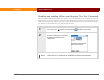
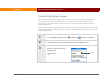
Check your VPN connection by drawing the Command stroke to
display the Command toolbar. Then verify that a lock icon appears in the Wi-Fi
signal strength indicator at the far right of the toolbar.
The selected VPN service is enabled and is used for future
connections.
VPN Prefs
VPN pick list
NOTE
Lock icon
Done