
User manual



Wi-Fi
®
card by palmOne 33
CHAPTER 3 Using a VPN Account
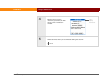
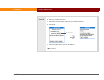
3 [ & ] OPTIONAL Change VPN options if required by your VPN administrator.
a. Select Details.
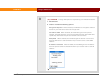
b. Check or uncheck the following options:
Encryption: Required When checked, all VPN data is encrypted. Uncheck
the box if your VPN server does not encrypt data.
Send All: To VPN When checked, all TCP/IP data goes to the private
network. Uncheck the box if you want only DNS requests and TCP/IP data
specifically destined for the private network to be sent there.
Query DNS When checked, the handheld gets the domain server name
from the VPN server. Uncheck the box if you need to enter a static DNS
address.
IP Address: Automatic When checked, the handheld gets the IP address
from the private network. Uncheck the box if you need to enter a static IP
address.
Continued