
User manual






Wi-Fi
®
card by palmOne 20
CHAPTER 3 Using a VPN Account
Working with VPN accounts on your
Tungsten
™
T5 or Tungsten
™
E2 handheld
Before you can use VPN for Wi-Fi
®
network connections, you need to set up a VPN account on the
handheld. The handheld uses this VPN account when you select the Connect VPN button as
described in Connecting to your VPN
using your Tungsten T5 or Tungsten E2 handheld. The
Tungsten E2 handheld has an auto-connect option in the VPN Preferences. For more information,
see Using Auto-Connect on the Tungsten E2
handheld.
Setting up a VPN account on your Tungsten T5 or
Tungsten E2 handheld
0
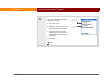
1 Start the VPN setup:
a. Go to Applications and select Prefs .
b. Select VPN.
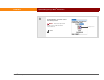
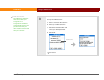
2 Select the VPN Account pick list,
and then select Add Account.
Continued
Before You Begin
[ ! ]
To set up a VPN on your
handheld, you need the
following information
from your network
administrator:
• Your VPN username
• Your VPN password
• The VPN server name
or address
Also, ask your
administrator about the
following:
• Is encryption required
for VPN data?
• Should all TCP/IP data
be sent to the VPN
server?
• Is a static DNS address
or IP address required?