
User manual






Wi-Fi
®
card by palmOne 14
CHAPTER 2 Synchronizing Using a Wi-Fi
®
Connection
Preparing your handheld
Follow these steps the first time you synchronize wirelessly to set up your network connection on
your handheld.
0
1 In the Applications/Home screen , select HotSync .
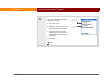
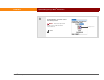
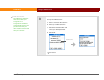
2 Select Network in the Modem
Sync Preferences dialog box:
a. Open the menus.
b. Select Options, and then
select Modem Sync Prefs.
c. Select Network.
d. Select OK.
Continued
Before You Begin
[ ! ]
Get the following
information from your
network administrator:
•Network name
assigned to your
computer
OR
• Network IP address
assigned to your
computer