
User manual



Wi-Fi
®
card by palmOne 13
CHAPTER 2 Synchronizing Using a Wi-Fi
®
Connection
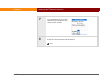
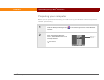
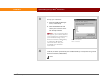
3 Set up your username:
a. From the HotSync Manager
menu, select Setup.
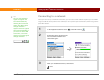
b. Click the Network tab and
select your username if it is
not already selected.
If your username does
not appear, you need to add it to
your computer by synchronizing
your handheld using a local,
direct connection (cable/cradle),
or infrared or Bluetooth
®
communication. See your
handheld User Guide for
instructions.
4 Click OK, and then synchronize your handheld with your computer using a local
direct connection (cable/cradle).
Done
NOTE
Checkmark indicates
name is selected.