
User manual






Wi-Fi
®
card by palmOne 3
CHAPTER 1 Setting Up Wi-Fi
®
Network Connections
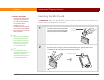
3 In the Applications/Home screen , select Prefs , and then select Wi-Fi.
4 From the Wi-Fi pick list, select
On. The Wi-Fi card searches for
available networks that publish
their network names and tries to
connect to one of them. This may
take a few moments.
5 To connect to a different network,
select it from the network pick
list. If the network you want does
not appear in the list, you need to
set it up on your handheld. See
Setting up a nonencrypted
network connection or Setting
up a WEP-encrypted network
connection depending on the
type of network you want to set
up.
Done
Pick list
Network pick list