
User's Manual Part 1





Section 12
Receiving SMS Messages
21
Receiving SMS Messages
To use SMS, you must first subscribe to and activate PCS Vision Services. See page 28.
Receiving a Message
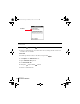
When you receive a message, the New Messages alert dialog appears.
Tap the screen as shown below, or use the following keys:
= OK = Select = Delete Msg.
Viewing Messages
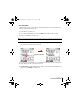
1. Press Option and then press PhoneBook to access SMS.
2. Use the scroll buttons to scroll through the messages.
Number of new
messages
Tap to select
how to respond
Tap to call sender
Tap to delete message
Tap to save message
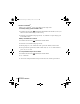
Tap to call sender
Tap to delete message
Tap to view a
specific category
Selected message
Sprint Start.book Page 21 Monday, June 17, 2002 8:57 AM