
User's Manual
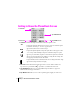
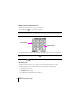
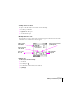

Table Of Contents
- Sprint PCS®
- The clear alternative to cellular.SM
- www.sprintpcs.com
- [cover]
- Table of Contents
- 1. Your New Sprint PCS Treo 2
- 2. Turning Your Phone On and Off 5
- 3. Using the Charger 6
- 4. Adjusting the Display 7
- 5. Using the Keyboard 8
- 6. Getting to Know the PhoneBook Screen 10
- 7. Making and Receiving Calls 11
- 8. Internal Phone Book 14
- 9. Controlling Your Roaming Experience 17
- 10. Changing Your Phone’s Settings 18
- 11. Sending and Receiving Voice Messages 20
- 12. Sending and Receiving SMS Messages 21
- 13. Sprint PCS® Service Features 23
- 14. Sprint PCS Wireless Web® 27
- 15. Your Phone’s Third Generation Capabilities 28
- 16. Your Phone’s Special Features 30
- 17. Accessing Other Applications 31
- 18. Date Book Plus 32
- 19. Memo Pad 35
- 20. Preferences and Other Settings 36
- 21. Synchronizing data 38
- 22. Beaming Information 39
- 23. Resetting Your Phone 40
- 24. Accessories for Your Phone 41
- 25. Upgrading from a Palm OS handheld 43
- 26. Troubleshooting 44
- 27. Performance and Safety 46
- 28. Terms and Conditions& Warranty Information 51
- How to Use This Guide
- Getting Extra Phone and Service Information
- Setting Up
- 1
- 2
- Computer system requirements for USB HotSync cable
- Computer system requirements for Serial HotSync cable (sold separately)
- To install the software:
- 3
- 4
- 5
- 1
- 2
- 3
- 4
- 5
- 6
- 7
- 8
- 9
- Your Phone’s Features
- 1. Power Button: Turns your phone and wireless mode on and off, and controls the keyboard backlight.
- 2. Stylus: Serves as the instrument used to tap options on your phone screen. To use the stylus, ...
- 3. Antenna: Receives and sends wireless communication signals. The antenna does not telescope out...
- 4. LED: Provides status information for your Sprint PCS Treo based on the color of the light and ...
- 5. IR Port: Uses infrared technology to transmit and receive data from other Palm OS devices. You...
- 6. Ringer Switch: Controls the ringer setting. Silencing the ringer turns off all system sounds, ...
- 7. Earpiece: Functions as the speaker when you use the wireless phone features of your Sprint PCS...
- 8. Headset Jack: Enables you to connect a hands-free headset for use with the wireless features. ...
- 9. Rocker/Volume Switch: Enables you to navigate on your phone with just one hand. You can use th...
- 10. Microphone: Functions as the mouthpiece when you use the wireless phone features of your Spri...
- 11. PhoneBook/SMS Button: Activates the PhoneBook application, and when used in combination with ...
- 12. Date Book Plus/To Do List Button: Activates the Date Book Plus application, and when used in ...
- 13. Display Screen: Displays the applications and information stored in your phone. It is touch- ...
- 14. Memo/Calculator Button: Activates the Memo Pad application, and when used in combination with...
- 15. Blazer/CityTime Button: Activates the Blazer web browser application, and when used in combin...
- 16. Scroll Buttons: Displays text and other information that extends beyond the viewing area of t...
- Turning Your Phone On and Off
- Turning Wireless Mode ON
- Turning Wireless Mode OFF
- Turning Handheld Mode ON
- Turning Handheld Mode OFF
- Entering text
- Entering accented characters and symbols
- Using Menus
- Using the keyboard backlight
- Getting to Know the PhoneBook Screen
- 1. Status Bar: Provides the following status information about your Sprint PCS Treo:
- 2. View Icons: Indicates which view currently appears on the screen. To switch to another view, t...
- 3. Speed Dial Buttons: Enables you to store and quickly dial a phone number. See page 16 for info...
- 4. Page Number Icons: Enables you to access other speed dial pages by tapping one of these icons.
- Making and Receiving Calls
- Getting to Know the PhoneBook Screen
- Making a call from the Speed Dial, Contacts, or Call History views
- 1. Make sure wireless mode is on. See page 5 for details.
- 2. Press PhoneBook repeatedly to display the view you want to use.
- 3. Begin typing the first initial and last name of the person you want to call. For more search o...
- 4. Use the scroll buttons to select the number you want to dial.
- 5. Press Space to dial.
- Making a call from the Dial Pad view
- Answering calls
- Sending calls to voicemail
- Working with active calls
- Ending a call
- Entering and saving contact information
- Finding or changing contact information
- 1. In the Contacts, Speed Dial, or Call History views, begin typing one of the following for the ...
- 2. Roll the rocker switch or use the scroll buttons to select the name.
- 3. Press Space to open the entry.
- 4. Press Menu and select Edit Contact (/E).
- 5. Make changes to the entry as necessary.
- 6. Hold Option and press Return to finish.
- Deleting a contact
- Defining speed dial buttons
- Setting Your Phone’s Roam Mode
- Adjusting Volume During a Conversation
- Selecting the Ringer Settings
- Silencing the Ringer
- Setting Up Voicemail
- Retrieving Voicemail Messages
- Accessing Voicemail From Another Phone
- Receiving a message
- Viewing messages
- Responding to messages
- 1. Press Option and then press PhoneBook to access SMS.
- 2. Use the scroll buttons to select the message to which you want to respond.
- 3. Press Space to open the message.
- 4. Press the scroll buttons to move between selectable items within the message.
- 5. Tap the action button to respond to the message.
- Sprint PCS® Service Features
- Call Waiting
- Call Forwarding
- 1. From the Speed Dial, Dial Pad, or Call History view, press Menu .
- 2. Under Options, select Call Preferences (/A).
- 3. Tap the Forward all calls to pick list.
- 4. Select the call forwarding option you want to use.
- 5. Hold Option and press Return to finish.
- 6. Listen for a confirmation tone. If you do not hear a tone, try calling yourself to see if the ...
- 1. From the Speed Dial, Dial Pad, or Call History view, press Menu .
- 2. Under Options, select Call Preferences (/A).
- 3. Tap the Forward all calls to pick list.
- 4. Select Don’t forward calls.
- 5. Hold Option and press Return to finish.
- 6. Listen for a confirmation tone.
- Three-Way Calling
- 1. Dial a number you wish to call.
- 2. Once you have established the connection, tap Hold and to put the first caller on hold.
- 3. Dial the second number you wish to call.
- 4. When you’re connected to the second party, tap 3-way Call or press the button on the headset (...
- 5. Tap Cancel 3-way or tap the headset button to end the second call and to return to the first c...
- Sprint PCS Voice CommandSM
- 1. From the Dial Pad view, tap followed by the handset button. The first time you use it, you wil...
- 2. You’ll hear a tone followed by the prompt “Ready.” Say “Add Name” to begin setting up your Per...
- 1. From the Dial Pad view, tap followed by the handset button.
- 2. You’ll hear a tone followed by the prompt “Ready.”
- 3. After the prompt, say “Call” and the name of the person or the number you want called.
- 4. Your request will be repeated and you will be asked to verify. Say “Yes” to call the number or...
- 1. From the Dial Pad view, tap followed by the handset button.
- 2. Say “Call the Web.”
- 3. Choose from a listing of information categories like e-mail, news, weather, sports and more.
- Sprint PCS Wireless Web®
- Your Phone’s Third Generation Capabilities
- Accessing Third Generation User Name
- Third Generation Services
- Third Generation Billing Information
- Using the Applications Launcher
- Using the application buttons
- Adding an event
- Scheduling an untimed event
- Scheduling a repeating event
- 1. Create the event as described on page 32, and tap the event to select it.
- 2. Tap Details.
- 3. Tap the Repeat box and tap a repeat interval.
- 4. Type a number on the Every line to show how often the event repeats.
- 5. (Optional) Tap the End on pick list, tap Choose Date, and select an end date.
- 6. Hold Option and press Return , and then press these keys again to finish.
- Rescheduling an event
- Displaying your calendar
- Deleting an event
- Creating a memo
- Reviewing or editing a memo
- Deleting a memo
- Setting General Preferences
- Reassigning the buttons on your phone
- Setting Formats Preferences
- Changing the screen fonts
- Performing a soft reset
- Performing a hard reset
- 1. While holding the power button, use the reset tool (or the tip of a paper clip) to gently pres...
- 2. When the system screen appears, release the power button.
- 3. When the warning appears, press the top scroll button.
- 4. If the language selection screen appears, select the same language you selected for your deskt...
- Accessories for Your Phone
- Using a Headset
- Additional Accessories
- How to Order
- Upgrading from a Palm OS handheld
- 1. Synchronize your old handheld with your old desktop software.
- 2. Under your Palm or Handspring folder, locate your User Name folder and store a copy of it in a...
- 3. Install your new desktop and synchronization software from your Sprint PCS Vision CD and put i...
- 4. Synchronize your new Sprint PCS Treo with your new desktop software, and select the user name ...
- 5. If any third party applications or data did not get installed, beam them from your old handhel...
- 6. After you upgrade you have two devices with the same user name. Since each device must have a ...
- Troubleshooting
- Upgrading from a Palm OS handheld
- My phone will not turn on.
- I have trouble synchronizing with my computer (performing a HotSync operation).
- 1. Perform a soft reset as described on page 40.
- 2. Make sure you have the correct HotSync cable for your computer (see page v).
- 3. Confirm that the cable is firmly secured to your computer and your Sprint PCS Treo as describe...
- 4. Click the HotSync Manager icon in the lower-right corner of your computer screen and make sure...
- 5. If you’re using a USB HotSync cable, disconnect all other USB devices, connect the HotSync cab...
- I can’t open the electronic User Guide.
- My Sprint PCS Treo will not connect to the Internet using Blazer or my e-mail application.
- Important Information About Your Phone and Service
- Maintaining Safe Use of and Access to Your Phone
- Caring for the Battery
- Acknowledging Special Precautions and the FCC Notice
- Terms and Conditions of Services Effective as of May 1, 2002 until replaced
- Handspring Product Warranty
Section 5
Using the Keyboard
9
Entering accented characters and symbols
1. Type the letter you want to accent.
2. Press ListType .
3. Use the scroll buttons to select the character on the list.
4. Press Space to insert the accented character or symbol.
Tip:You can find more symbols under related characters. For example, the £ symbol is located under the $ key. To view a
list of available accented and symbol characters, press Menu and under Edit select Keyboard Help (/G).
Using Menus
1. Press Menu to display the menus.
2. Press the top scroll button to switch between menus.
3. Press the bottom scroll button to select a command within a menu.
4. Press Space to run the selected command.
You can also do any of the following:
Press Menu again to close the menus without running a command.
Type shortcut letters to select menu commands. Shortcut letters appear next to the
command on each menu item on the screen and menu selection instructions in this guide.
For example, in the previous section, (/G) is the shortcut for the Keyboard Help command.
Using the keyboard backlight
Press the Power button twice to toggle the keyboard backlight on and off.
Note:The keyboard backlight is noticeable only in relatively dark environments, and when it is on, the screen
brightness automatically dims to conserve battery power.