
User's Manual




Chapter 21 Setting Preferences for Your Handheld
360
Assigning a password
You can assign a password to protect your private records and to lock your
handheld.
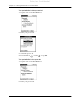
To assign a password:
1. Tap the Password box.
2. Enter a password.
3. Enter a hint to help your remember your password if you forget it. This is
optional.
4. Press Function + Enter
,
or tap OK.
5. Enter the same password a second time, and press Function + Enter
,
or
tap OK.
Changing or deleting a password
Once you define a password for your handheld, you can change or delete it at any
time. You must enter the current password before you can change or delete it.
Tap here
Palm, Inc. Confidential