
User's Manual




Mobile preferences
343
When FND is enabled:
■ Dialing is estricted to numbers contained in the FND phone book, except for
emergency calls.
■ You can extend an FND entry by adding digits to the dial string. This makes it
possible to restrict dialing to a specific country or area code.
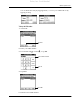
To view or dial an FND entry:
1. Select Security.
2. Select the Fixed dialing box.
3. Select an entry and tap Dial.
You go to the Palm
TM
Mobile main screen and the number is dialed.
Ta p Se c u r i t y
Tap box
Select an entry
Ta p D i a l
Palm, Inc. Confidential