
User's Manual




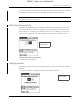


Network preferences
335
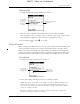
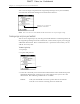
4. Repeat steps 2 and 3 until the login script is complete.
5. Press Function + Enter , or tap OK.
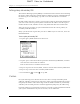
Plug-in applications
You can create plug-in applications containing script commands that extend the
functionality of the built-in script commands. A plug-in application is a standard
PRC application that you install on your handheld just like any other application.
After you install the plug-in application, you can use the new script commands in
a login script.
Plug-in applications have the following characteristics:
■ Written in C language
■ Compiled into a device executable
■ Called properly from a login script
■ Able to return control to a login script after it terminates
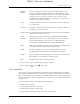
Wait For
Prompt
Detects a challenge-response prompt coming from the server
and then displays the dynamically generated challenge value.
You then enter the challenge value into your token card, which
in turn generates a response value for you to enter on your
handheld. This command takes two arguments, separated by a
vertical bar (|) on the input line.
Send
Transmits specific characters to the TCP/IP server to which you
are connecting.
Send CR
Transmits a carriage return or LF character to the TCP/IP server
to which you are connecting.
Send User ID
Transmits the user ID information entered in the User ID field of
the Network Preferences screen.
Send
Password
Transmits the password entered in the Password field of the
Network Preferences screen. If you did not enter a password,
this command prompts you to enter one. The Password
command is usually followed by a Send CR command.
Delay
Tells your handheld to wait a specific number of seconds before
executing the next command in the login script.
Get IP
Reads an IP address and uses it as the IP address for your
handheld. This command is used with SLIP connections.
Prompt
Opens a dialog box and prompts you to enter text of some kind
(for example, a password or a security code).
End
Identifies the last line in the login script.
DRAFT Palm, Inc. Confidential