
User's Manual






Chapter 18 Setting Preferences for Your Handheld
334
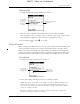
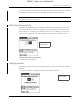
You can create login scripts from the Login Script dialog box on your handheld,
accessed from the Details dialog box in Network Preferences.
NOTE You can also use non-ASCII and literal characters in your login script.
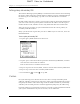
Creating a login script on your handheld
You can create login scripts by selecting commands from the Command pick list in
the Login Script dialog box. Some commands, such as Send, require you to supply
additional information. Those commands have a parameter field so that you can
add the necessary data.
To create a login script:
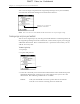
1. Tap Script.
2. Tap the End pick list.
3. Select the command you want from the Command list. If the command requires
additional information, a field appears to the right of it for you to enter the
information. The following commands are available:
Tap here to see the list of
available commands
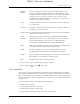
Wait For
Tells your handheld to wait for specific characters from the
TCP/IP server before executing the next command.
Tap here
DRAFT Palm, Inc. Confidential