
User's Manual







Going beyond the basics
237
Creating mail filters
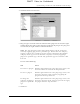
To create a mail filter, you select various criteria, such as To, From, and Contains.
This information makes up the filter statement.
For example, if you want stock quotes from your online brokerage service sent to
a specific folder, you can filter those e-mail messages and store them in the Inbox
folder. The filter statement, which is displayed in the Filter Editor, is shown in the
following figure.
To create a filter:
1. Press Function + Menu .
2. Select Options, and then select Filter Mail.
3. Tap New.
4. Enter a short description of the filter in the Name field.
5. Use the If the pick lists to create criteria for the filter.
FLOW
DRAFT Palm, Inc. Confidential