
User's Manual







Chapter 14 Using Palm™ VersaMail™ Personal E-mail Software
234
Synchronizing an account
To synchronize accounts, you must set the HotSync action for the VersaMail
application in the HotSync Manager. You can, however, exclude e-mail accounts
from a HotSync operation.
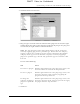
TIP If you don’t want an account synchronized, deselect the check box Select this
check box to synchronize this e-mail account when you perform a HotSync operation.
To select which accounts are synchronized during a HotSync operation:
1. Click the HotSync Manager icon in the Windows system tray.
2. Select Custom.
3. Select VersaMail
in the Conduit list.
4. Click Change.
DRAFT Palm, Inc. Confidential