
User's Manual







Synchronizing e-mail between the handheld and the desktop
229
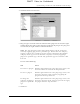
4. Under Device Settings, click Server Settings.
5. If you are using an account that is already configured on your handheld, the
account information will already be entered. If not, enter the following:
–
Incoming Mail Server: Enter the name of your incoming (POP) mail server,
such as pop.mail.yahoo.com.
–
Incoming Mail Server Port Number: The default is 110 for POP and 143 for
IMAP servers respectively. If you are not sure about the correct port number,
check with your mail server administrator.
–
Whether this account requires APOP authentication (POP accounts only):
Selecting this check box encrypts your username and password when
traveling over the network. Some services require APOP to work properly,
while others do not work properly if APOP is used. If you aren’t sure if your
ISP or web e-mail provider supports APOP, check with your e-mail provider.
See “Adding APOP to an account” later in this chapter.
–
Outgoing Mail Server: Enter the name of your outgoing (SMTP) mail server,
such as smtp.mail.yahoo.com.
–
Outgoing Mail Server Port Number: The default is 25, the port number most
SMTP servers use. If you are not sure about the correct port number, check
with your mail server administrator.
–
Whether this account requires ESMTP authentication: Select this option if the
outgoing server (SMTP) requires authentication. Check with your system
Login Name
Enter the username you use to access your e-mail. This is
generally the part of your e-mail address appearing before
the @ symbol; it is usually not your entire e-mail address.
Password
Enter the password for this account.
DRAFT Palm, Inc. Confidential