
User's Manual





Getting, sending, and managing e-mail
187
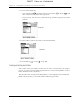
Alternately, tap the folder that you want.
TIP You can also move a single e-mail message from within the body of the message
by pressing Command , tapping the folder icon, and selecting the destination
folder from the pick list. See “Using the command bar” later in this chapter for more
information on the command bar.
To move multiple e-mail messages:
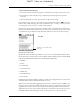
1. Tap the folder that contains the e-mail messages you want to move.
2. Select the messages by tapping to the left of each message icon.
TIP To select a group of adjacent messages, drag the stylus to the left of the
message icons.
A checkmark appears next to the selected messages.
SHOW
SHOW
DRAFT Palm, Inc. Confidential