
User's Manual





Chapter 14 Using Palm™ VersaMail™ Personal E-mail Software
186
Moving e-mail between folders
You can move one or more e-mail messages between folders.
To move one e-mail message:
1. Press Right on the navigator to move to and open the folders pick list in the
upper-right corner of the screen. Press Up or Down to move to the folder you
want, and the press Select to select the folder.
Alternately, tap the folders pick list in the upper-right corner of the screen, and
then tap the folder name.
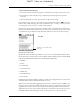
2. Tap the icon to the left of the message, press Right on the navigator to open the
Message menu, press Down to move to the Move To option, and then press
Select to select this option.
Alternately, tap the icon to the left of the message, and then tap Move To from
the pop-up menu.
The folders pick list appears.
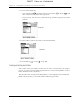
3. Press Up or Down on the navigator to move to the folder you want, and then
press Select to select the folder.
SHOW
SHOW
DRAFT Palm, Inc. Confidential