
User's Manual





Chapter 14 Using Palm™ VersaMail™ Personal E-mail Software
184
To change the font:
1. Tap Display.
2. Tap the font pick list, and then tap the font you want.
To select colors for read and unread mail:
1. Tap Display.
2. Tap the Unread pick list, and then tap the color you want to use to display
unread messages.
3. Tap the Read pick list, and then the color you want to use to display read
messages.
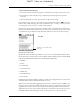
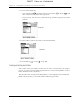
In the list view itself, you can also change the size of the columns.
FLOW
FLOW
DRAFT Palm, Inc. Confidential