
User's Manual





Getting, sending, and managing e-mail
183
To change the sort order:
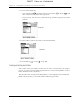
1. Tap Display.
2. Tap the Sort by pick list, and then tap the column name.
3. Tap Descend or Ascend to change the sort order.
To select a one-line or two-line view:
1. Tap Display
2. Tap the Show pick list, and then tap the view you want.
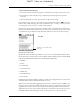
To display or hide a column in a folder’s list view:
1. Tap Display.
2. Tap the check box for each column that you want to show. The column options
will change depending on whether you choose a one-line or a two-line view.
NOTE If you select Date, the Date column displays the message time for any
messages received today—that is, any message received after 12:01 A.M.
Otherwise, the Date column shows the date the message was received.
FLOW
FLOW
DRAFT Palm, Inc. Confidential