
User's Manual





Chapter 14 Using Palm™ VersaMail™ Personal E-mail Software
182
deleting e-mail” later in this chapter for instructions on choosing to receive e-mail
in HTML or plain text format.
NOTE The VersaMail application sends all messages as plain text only, even if you
are forwarding or replying to a message that was originally sent as HTML.
Viewing other folders
When you get new e-mail, it appears in the account’s Inbox folder. You can move
an e-mail message from one folder to another and then view it in the destination
folder.
To view other folders:
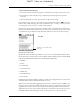
1. Tap the folders pick list in the upper-right corner of the screen.
2. Tap the folder you want to view.
Managing display options in the folder’s list view
You can customize the way in which messages appear in the list view of your mail
folders. The options you choose apply to all folders.
The display options you can customize, and the default settings, are as follows:
Option Default
Sort by Date
Sort order Descending
Summary view Two-line view
Summary view columns Sender, Date, Subject
Font Palm 9
Unread message color Black
Read message color Black
Available folders
SHOW
DRAFT Palm, Inc. Confidential