
User's Manual





Getting, sending, and managing e-mail
179
4. Select the Get mail automatically check box.
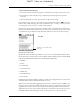
5. Set schedule options:
6. Tap OK.
7. (Optional) Tap Get Mail or HotSync. You should perform a manual Get Mail or
HotSync operation after setting up scheduled retrieval of e-mail. This ensures
that only new messages will be retrieved during scheduled e-mail retrieval.
Scheduled e-mail retrieval retries
If the interval for scheduled retrieval of e-mail is set at “Every 1 hour” or less
frequently, and a scheduled retrieval fails for any reason, the VersaMail application
will continue attempting to retrieve e-mail at 30-minute intervals until either the
next scheduled retrieval of e-mail occurs or the end time for scheduled e-mail
Interval
Tap the Every pick list and select the time interval, from
15 minutes to 12 hours. See “Cost issues with scheduled
e-mail retrieval” for information on setting the interval.
Start Time
Tap the Start Time box, tap to enter the start time hour and
minute, and tap to enter AM or PM. Tap OK.
End Time
Tap the End Time box, tap to enter the end time hour and
minute, and tap to enter AM or PM. Tap OK.
Days
Tap days schedule will be active. You can choose any
number of days, but you can only set up one schedule per a
given e-mail account.
FLOW
FLOW
FLOW
DRAFT Palm, Inc. Confidential