
User's Manual





Chapter 14 Using Palm™ VersaMail™ Personal E-mail Software
146
Creating a network e-mail account
You create a new account in Account Setup, which guides you through the process.
To create a network e-mail account:
1. Press Function + Menu , select Accounts, and select Account Setup.
2. Tap New.
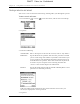
3. Enter the following:
If the VersaMail application knows the protocol for the mail service you
selected, it displays the correct protocol.
4. Tap Next.
Account Name
Enter a descriptive name for the account, such as “My Yahoo.”
Mail Service
Tap the Mail Service pick list and select the provider to which
you are connecting. Select Other if your ISP is not listed. If you
set up a VPN on your handheld, the VPN connection appears
in the Mail Service pick list. Select this connection if you want
to connect to your corporate network using the VPN. See
“VPNs” earlier in this chapter for information.
Protocol
Tap the Protocol pick list and select POP or IMAP. (Most e-mail
providers use the POP protocol.)
DRAFT Palm, Inc. Confidential