
User's Manual

11
www.i-display.com
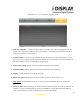
Right In menu mode this function is used for moving right through the various options. In playback
mode you can go to the next content in the playlist.
(Note it is only operable for content copied from USB or SD card not for content downloaded
from I Display Server)
Up In menu mode it is used for moving up. It is not operable in playback mode.
Down In menu mode it is used for moving down. It is not operable in playback mode
Enter In menu mode, it is used to select an option. It is not operable in playback mode
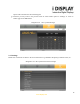
OSD While playlist is being viewed in menu mode and the OSD function is pressed, a table with
Copy/Delete/Sort will appear, enabling
the use of these functions on the playlist content.
NB. P
laylist refers to only that which is copied from USB or SD Card or a playlist viewed
from SD card and
not for content downloaded from I Display Server)
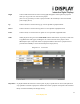
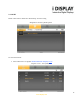
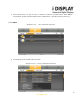
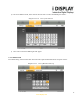
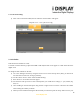
Diagram 2.1.2 Screen Shot
Play/Pause In playback mode this function is used to pause or play a specific JPG or movie (This function is
only operable on content copied from a USB or SD Card or a playlist viewed from a SD card and
not for content downloaded from I Display Server).