
Outback FM80 User Manual






MATE-Class Screens
84 900-0009-01-00 Rev D
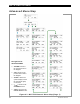
MATE and MATE2 FLEXmax Menu Maps
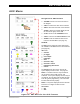
STATUS Menu Map
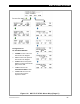
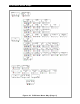
Figure 91 MATE STATUS Menu Map (Page 1)
Navigation for
STATUS/CC/PAGE1
o
<
DOWN
>
moves to
the next menu item in
the diagram.
o
<
UP
>
returns to the
previous menu item in
the diagram.
o
<
PORT
>
directs the
system display to read
the next device (port) on
the HUB.
o
<
TOP
>
returns to the
STATUS/CC/PAGE1
screen.
o
<
STATUS
>
returns to
the screen at the top of
the res
p
ective column.